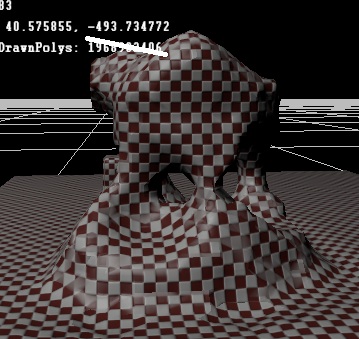
| Volumes Of Fun http://www.volumesoffun.com/phpBB3/ |
|
| PolyVox as Terrain builder http://www.volumesoffun.com/phpBB3/viewtopic.php?f=2&t=63 |
Page 4 of 7 |
| Author: | [WuTz]! [ Wed Jun 30, 2010 2:24 pm ] |
| Post subject: | Re: PolyVox as Terrain builder |
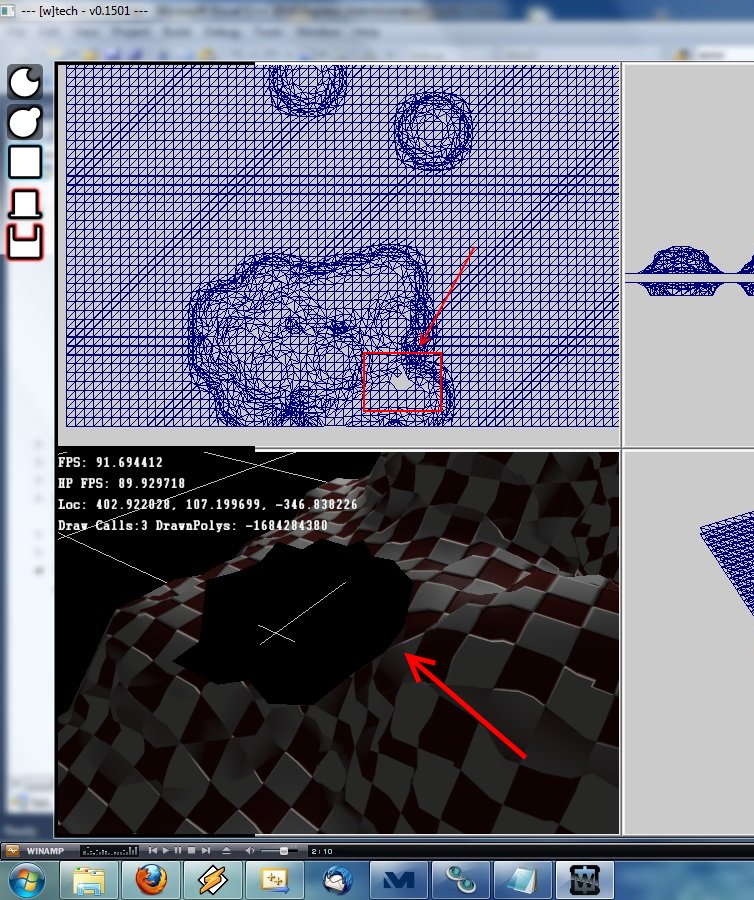
So, everything is working again! But while I was doing my first test, I got a hole in my terrain? Attachment: ![]() hole.jpg [ 231.03 KiB | Viewed 3142 times ] I just added a few voxels. The hole disappeared when I placed a sphere on top, but I just wanted to let you know of this little bug. (Also my grid disappears when I resize the window, too much of mysterious disappearing in my engine! |
|
| Author: | [WuTz]! [ Wed Jun 30, 2010 2:59 pm ] |
| Post subject: | Re: PolyVox as Terrain builder |
I got my first problem! Why do I get a hole (A normal one, not that bug-caused from above) when I set the density to something lower than 8? |
|
| Author: | David Williams [ Wed Jun 30, 2010 5:43 pm ] |
| Post subject: | Re: PolyVox as Terrain builder |
Ok, well I'm glad you have it mostly working Firstly, PolyVox decides where to place the triangles. It always places them where a solid voxel is adjacent to an empty voxel. Under the old system, a voxel was solid if its 'material id' was greater than zero, and was empty if its material id was exactly zero. This is no longer the case - in fact PolyVox does not even look at the material id when deciding if a voxel is solid or empty. Under the new system, PolyVox decides whether a voxel is solid or empty by looking at its density. The density can range from 0 to 15, and the halfway value is 8. If the density of a voxel is less than the 8 then it is empty, if it is more than the 8 then it is solid. After PolyVox has decided where the triangle vertices should be placed it then determines what material they should have. It decides this by looking at the material part of the voxel. This results in some interesting differences from the previous system: 1) It is perfectly possible for a solid voxel to have a material of zero, because the material does not influence whether the voxel is solid of not. Now, I don't whether you are using the material from the triangle yet, but looking at your screenshot I can see that you are rendering some triangles in black. I suspect that these triangle have a material of zero, and that your rendering code doesn't handle this. 2) You can set the material of all the voxels to the same value, and you can still edit the surface. If fact I think you should try this to see what I mean. Set every single voxel to have a material of '1'. Then set the voxels which you want to be solid to have a density of something greater than 8, and those you want to be empty to have a density less than 8. Do you still get holes? I realise this seems confusing, but hopefully you start to see how the shape of the terrain is now completly seperate from its material? If so, the I will try to explain how this helps with smoothing... |
|
| Author: | [WuTz]! [ Wed Jun 30, 2010 6:00 pm ] |
| Post subject: | Re: PolyVox as Terrain builder |
Quote: 1) It is perfectly possible for a solid voxel to have a material of zero, because the material does not influence whether the voxel is solid of not. Now, I don't whether you are using the material from the triangle yet, but looking at your screenshot I can see that you are rendering some triangles in black. I suspect that these triangle have a material of zero, and that your rendering code doesn't handle this. I'm not using the Material of the vertices at all. It's just a triplanar textured and shaded mesh. Also in my shot I was just adding (Can I say that?) new voxels which means changing the Material and the Density to >0. In my shot I only used a density of 15 and a material number of 1. You can see that there is a hole in the mesh at the little bit of the grid looking through it. Quote: 2) You can set the material of all the voxels to the same value, and you can still edit the surface. If fact I think you should try this to see what I mean. Set every single voxel to have a material of '1'. Then set the voxels which you want to be solid to have a density of something greater than 8, and those you want to be empty to have a density less than 8. Do you still get holes? See Answer to 1. Quote: I realise this seems confusing, but hopefully you start to see how the shape of the terrain is now completly seperate from its material? If so, the I will try to explain how this helps with smoothing... Yes I understood it. |
|
| Author: | David Williams [ Wed Jun 30, 2010 8:20 pm ] |
| Post subject: | Re: PolyVox as Terrain builder |
[WuTz]! wrote: I'm not using the Material of the vertices at all. It's just a triplanar textured and shaded mesh. Also in my shot I was just adding (Can I say that?) new voxels which means changing the Material and the Density to >0. In my shot I only used a density of 15 and a material number of 1. You can see that there is a hole in the mesh at the little bit of the grid looking through it. I see... and did you also use a material of one for the empty voxels? Anyway, in order to solve your hole maybe you could send me a copy of the volume so I can load it into Thermite? I've never really tried this before but you should be able to use the 'saveAsRaw()' function in Serialization.h. It might be quite large, so zip it up in that case. I'm not sure if this forum supports attachments, use them if you can but otherwise email it to me. [WuTz]! wrote: Yes I understood it. The smooth surfaces work something like this. PolyVox looks at two voxels at a time, and if one is empty and the other is solid then PolyVox places a vertex of a triangle between the two voxels. Under the old system this vertex was always placed exactly halfway between the two voxels. Under the new system it does not have to go exactly halfway between, instead the position is calculated from the densities. The key to achiving a smooth mesh is to avoid having a completly solid (density 15) voxel next to a completly empty (density 0) voxel. Instead, density values should gently fade off towards the edge of the object (as shown in my 2D example image on the previous page). So, how do you create a volume with values which gently fall off? The answer is that I don't exactly know Firstly, I guess you have a tool for creating a sphere of voxels. At the moment I guess that you set a voxel to be solid if it is less than a certain distance from the centre of the sphere. To make this have a gentle falloff you would use the distance from the centre to compute the density. Voxels close to the centre would get a density of 15, and those further away would get lower densities until they fell below the threshold of 8. An alternative is to create your terrain using only densities of 0 and 15 and then blur the result. Looking again at my image on the previous page, you can see that the soft circle is just a blurred version of the sharp one. I have added a function in Filters.h called smoothRegion() which will basically blur a part of the volume. Really, I have to do a lot more research to design appropriate tools. But you can see that it is possible in principle to have smooth terrain. |
|
| Author: | [WuTz]! [ Thu Jul 01, 2010 6:16 pm ] |
| Post subject: | Re: PolyVox as Terrain builder |
Quote: I see... and did you also use a material of one for the empty voxels? Anyway, in order to solve your hole maybe you could send me a copy of the volume so I can load it into Thermite? I've never really tried this before but you should be able to use the 'saveAsRaw()' function in Serialization.h. It might be quite large, so zip it up in that case. I'm not sure if this forum supports attachments, use them if you can but otherwise email it to me. No, all material IDs are zero for empty voxels. When I have time for that I will make a volume file and send it to you. You must know, my Internet connection is pretty slow, so an upload of 20mb could take some hours. [WuTz]! wrote: Yes I understood it. The smooth surfaces work something like this. PolyVox looks at two voxels at a time, and if one is empty and the other is solid then PolyVox places a vertex of a triangle between the two voxels. Under the old system this vertex was always placed exactly halfway between the two voxels. Under the new system it does not have to go exactly halfway between, instead the position is calculated from the densities. The key to achiving a smooth mesh is to avoid having a completly solid (density 15) voxel next to a completly empty (density 0) voxel. Instead, density values should gently fade off towards the edge of the object (as shown in my 2D example image on the previous page). Quote: An alternative is to create your terrain using only densities of 0 and 15 and then blur the result. Looking again at my image on the previous page, you can see that the soft circle is just a blurred version of the sharp one. I have added a function in Filters.h called smoothRegion() which will basically blur a part of the volume. I think that is the easiest and best looking method. But that method has it's problems, too. When I do something like that: Code: void WVoxelTerrainComponent::CreateVoxelSphereAt(D3DXVECTOR3* Pos, float Radius,UINT MaterialID) { for(UINT x=0;x<Radius;x++) { for(UINT y=0;y<Radius;y++) { for(UINT z=0;z<Radius;z++) { D3DXVECTOR3 cp=D3DXVECTOR3(x-((float)Radius/2),y-((float)Radius/2),z-((float)Radius/2)); if(D3DXVec3Length(&cp)<(float)Radius/2) { if( x+Pos->x-(Radius/2) < 0 || x+Pos->x-(Radius/2) >GridSize.x-1 || y+Pos->y-(Radius/2) < 0 || y+Pos->y-(Radius/2) >GridSize.y-1|| z+Pos->z-(Radius/2) < 0 || z+Pos->z-(Radius/2) >GridSize.z-1) { continue; } VoxelVolume->setVoxelAt(x+Pos->x-(Radius/2),y+Pos->y-(Radius/2),z+Pos->z-(Radius/2),MaterialDensityPair44(MaterialID,ncDEFAULT_DENSITY)); } } } } smoothRegion(*VoxelVolume,Region(Vector3DInt16(Pos->x-Radius,Pos->y-Radius,Pos->z-Radius),Vector3DInt16(Pos->x+Radius,Pos->y+Radius,Pos->z+Radius))); GenerateMesh(); } that gives problems because I place a sphere, and that function smoothes a cube. When I place some spheres together, I get holes (Normal holes) in the ground, because it gets oversmoothed at the borders where no voxels of the sphere are. Is there a possibility to turn the smoothing region into a sphere? Anyways, great work! I got it smoother than ever before! Edit: Another thing you might want to know: The code I posted above seems to produce a better sphere than the function of the OpenGL sample. With that function, every sphere had a spike on its sides, and also I got many many buggy holes with it. So, you may want to try it out? |
|
| Author: | David Williams [ Thu Jul 01, 2010 8:01 pm ] |
| Post subject: | Re: PolyVox as Terrain builder |
[WuTz]! wrote: David Williams wrote: I see... and did you also use a material of one for the empty voxels? No, all material IDs are zero for empty voxels. You should really try changing this. Make every voxel have a material id of '1', even the empty ones. It will make things simpler because you will have only one material for your whole mesh, rather than two different ones. I think it might fix some holes. You can still control the shape of the mesh using the density values. [WuTz]! wrote: When I have time for that I will make a volume file and send it to you. You must know, my Internet connection is pretty slow, so an upload of 20mb could take some hours. Don't worry, it won't be that big. When you use .zip compression the filesize is reduced by 10-100 times for these volumes. They are very compressable. [WuTz]! wrote: Quote: An alternative is to create your terrain using only densities of 0 and 15 and then blur the result. Looking again at my image on the previous page, you can see that the soft circle is just a blurred version of the sharp one. I have added a function in Filters.h called smoothRegion() which will basically blur a part of the volume. I think that is the easiest and best looking method. Yeah, maybe... like I said I haven't really tested it [WuTz]! wrote: But that method has it's problems, too. When I do something like that: . . . that gives problems because I place a sphere, and that function smoothes a cube. When I place some spheres together, I get holes (Normal holes) in the ground, because it gets oversmoothed at the borders where no voxels of the sphere are. Is there a possibility to turn the smoothing region into a sphere? It would be possible, but I'll have to let you work it out Otherwise, you can just let the user edit a jagged terrain and then provide a button which they click when they are finished which will call smoothRegion() on the whole volume. [WuTz]! wrote: Anyways, great work! I got it smoother than ever before! Ok, now the bad news. Unfortunatly I will be very busy for the next 6 weeks and will not have much time for PolyVox/Thermite |
|
| Author: | [WuTz]! [ Sat Jul 03, 2010 4:54 pm ] |
| Post subject: | Re: PolyVox as Terrain builder |
So, here is some progress: Attachment: ![]() Smooth_Terrain.jpg [ 52.76 KiB | Viewed 3113 times ] I got the smoothing of the volume ready so far as you see. You can also add spheres smoothly on top of each other. The holes were reduced to a minimum, but they still happen sometimes. Also I build in the functionality to break the volume into chunks and now I can edit the volume even in debug mode without having to wait about 7-8 seconds I also have spent some thoughts at how to render alpha blended layers on top of the terrain. That means, smoothly blended materials over multiple vertices. Not as hard as the current implementation in PolyVox does. To get that, I could do it like that: Have one volume for the geometry, lets say at a size of 64^3. That generates the Polygonal mesh, but has no materials assigned. Now the user creates a new alpha layer which represents the occurrence of the first material, and with it a new volume. This volume isn't at the same size as the geometry volume, no, the size gets divided by a certain value and so it has a lower resolution than the original volume, but also lower memory requirements. And I think for a alpha layer that is acceptable. So, the alpha value can reach from 0 to 255 because I don't need the density here. Every time the main volume gets modified, the layer-volumes get the modification as well. Now is mesh generation time. Lets say, the player drops a bomb somewhere. It explodes and the terrain gets deformed. Firstly I would check in which (chunk)sector the bomb exploded, to get rid of untouched geometry. When I found a deformed sector, I would let the extractor make a new mesh out of the main volume. Then I would copy it as many times as layers touch the current sector (That means: Which layers have at least one voxel with Alpha >0). So lets say I have 3 layers in that sector, so I would copy it 3 times. Then I would iterate over the vertices of all layer-meshes to find the nearest voxel to the current vertex. The alpha value could be copied into a variable I don't need for the terrain, just like the Tangent vector or another one. To render, the layer meshes would be just blended together. Do you think that is a good approach? Or do you have another idea? Or some to make it better? Just let me know |
|
| Author: | David Williams [ Sun Jul 04, 2010 5:49 pm ] |
| Post subject: | Re: PolyVox as Terrain builder |
It looks like you have made some more great progress! Your proposal sounds reasonable but I'd make a couple of points. Firstly, if you only want to store a density value for each voxel then it is a shame to waste the 4 bits per voxel which are currently allocated to the material. Fortunatly it is very easy to create a new voxel type because the surface extractor a template function. You just need to make sure that your new voxel class has functions called 'getMaterial()' and 'getDensity()'. Copy the MaterialDensityPair class and rname it to something else like 'DensityValue'. Change the 'getMaterial()' function to return a constant value such as one, and then use a full uint8_t to store the density value. Lastly, declare your surface extractor class as SurfaceExtractor<Your_Class_Name_Here> instead of SurfaceExtractor<MaterialDensityPair44>. Secondly, you talk about getting the vertex position and then sampling the seperate material volume to determine the material. If I were you I would look at using a 3D texture on the GPU instead of a PolyVox volume for this. That way you can do the lookup in the shaders and get all the interpolation/scaling for free. Of course, you might need to be able to change this texture at run-time but I don't think that would be too bad. |
|
| Author: | [WuTz]! [ Tue Jul 13, 2010 4:54 pm ] |
| Post subject: | Re: PolyVox as Terrain builder |
I hadn't much time in the last weeks, but anyways I put in some very cool things into my engine. Here is the one which has something to do with polyvox! ![]() That are just smoothly blended layers, painted on the mesh by me. My goal is to have one shader which runs per layer. I've posted something about this at GameDev.Net: http://www.gamedev.net/community/forums ... _id=576624 My 3rd idea seems to be the best. I may start implementing it tomorrow, any feedback is appreciated. |
|
| Page 4 of 7 | All times are UTC |
| Powered by phpBB © 2000, 2002, 2005, 2007 phpBB Group http://www.phpbb.com/ |
|