Attachment:
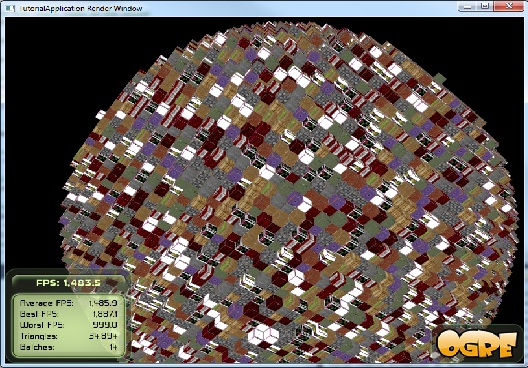
textureatlasdone.jpg [ 126.01 KiB | Viewed 2417 times ]
So I have the texture atlas done now (thanks in large part to the members of this forum, and LBDude from the ogre community) I am however still unable to use the alpha channel of the png for some reason. This is the cg code I'm using now:
Code:
void ColouredCubicVoxelVP(
float4 inPosition : POSITION,
float2 inMaterial : TEXCOORD0,
out float4 outClipPosition : POSITION,
out float4 outWorldPosition : TEXCOORD0,
out float2 outMaterial : TEXCOORD1,
uniform float4x4 world,
uniform float4x4 viewProj
)
{
//Compute the world space position
outWorldPosition = mul(world, inPosition);
//Compute the clip space position
outClipPosition = mul(viewProj, outWorldPosition);
//Pass through the material
outMaterial = inMaterial;
}
void ColouredCubicVoxelFP(
float4 inPosition : POSITION,
float4 inWorldPosition : TEXCOORD0,
float4 inMaterial : TEXCOORD1,
uniform sampler2D heightMap : TEXUNIT0,
out float4 result : COLOR)
{
float3 worldNormal = cross(ddy(inWorldPosition.xyz), ddx(inWorldPosition.xyz));
worldNormal = normalize(worldNormal);
//World position is used as texture coordinates. Choose which
//two components of world position to use based on normal. Could
//optionally use a different texture for each face here as well.
float2 uv;
float materialID = inMaterial.x * 256.0 ;
float atlasYOffset = floor(materialID / 16);
float atlasXOffset = materialID - (atlasYOffset * 16);
//testing
//atlasXOffset = 5;
//atlasYOffset = 1;
if(worldNormal.x > 0.5){
uv = inWorldPosition.yz;
}
if(worldNormal.x < -0.5){
uv = inWorldPosition.yz;
}
if(worldNormal.y > 0.5){
uv = inWorldPosition.xz;
}
if(worldNormal.y < -0.5){
uv = inWorldPosition.xz;
}
if(worldNormal.z > 0.5){
uv = inWorldPosition.xy;
}
if(worldNormal.z < -0.5){
uv = inWorldPosition.xy;
}
uv = frac(uv / 16 + .5);
uv = (float2(atlasXOffset, atlasYOffset) + float2(uv));
uv = uv / 16;
result = tex2D(heightMap, uv);
}
float4 inPosition : POSITION,
float2 inMaterial : TEXCOORD0,
out float4 outClipPosition : POSITION,
out float4 outWorldPosition : TEXCOORD0,
out float2 outMaterial : TEXCOORD1,
uniform float4x4 world,
uniform float4x4 viewProj
)
{
//Compute the world space position
outWorldPosition = mul(world, inPosition);
//Compute the clip space position
outClipPosition = mul(viewProj, outWorldPosition);
//Pass through the material
outMaterial = inMaterial;
}
void ColouredCubicVoxelFP(
float4 inPosition : POSITION,
float4 inWorldPosition : TEXCOORD0,
float4 inMaterial : TEXCOORD1,
uniform sampler2D heightMap : TEXUNIT0,
out float4 result : COLOR)
{
float3 worldNormal = cross(ddy(inWorldPosition.xyz), ddx(inWorldPosition.xyz));
worldNormal = normalize(worldNormal);
//World position is used as texture coordinates. Choose which
//two components of world position to use based on normal. Could
//optionally use a different texture for each face here as well.
float2 uv;
float materialID = inMaterial.x * 256.0 ;
float atlasYOffset = floor(materialID / 16);
float atlasXOffset = materialID - (atlasYOffset * 16);
//testing
//atlasXOffset = 5;
//atlasYOffset = 1;
if(worldNormal.x > 0.5){
uv = inWorldPosition.yz;
}
if(worldNormal.x < -0.5){
uv = inWorldPosition.yz;
}
if(worldNormal.y > 0.5){
uv = inWorldPosition.xz;
}
if(worldNormal.y < -0.5){
uv = inWorldPosition.xz;
}
if(worldNormal.z > 0.5){
uv = inWorldPosition.xy;
}
if(worldNormal.z < -0.5){
uv = inWorldPosition.xy;
}
uv = frac(uv / 16 + .5);
uv = (float2(atlasXOffset, atlasYOffset) + float2(uv));
uv = uv / 16;
result = tex2D(heightMap, uv);
}
I need to clean up the edges, not sure how so if anyone has advice I would be grateful. I'm am just using
Code:
filtering anisotropic
max_anisotropy 8
max_anisotropy 8
in my material, which I was under the impression wouldn't cause any bleeding. (I also tried it without the filtering and the bleeding is the exact same).
Also, I had a question about the MaterialDensityPair44 object - where is it declared in the polyvox stuff, I can't even seem to find it even though I'm using it. I really need more than 4 bits for the material, and probably only 1 bit for the density (either it's there or it''s not right?) Honestly, I'm pretty sure I'll want at least 16 bits per voxel, probably more. (around 10-12 for material (need to think of expandability in the future) 1 for density, and the rest for state (think powered, pathable, any other states you would want to store on a per-voxel basis). Anyways, if you could tell me where to look to start digging into the MaterialDensityPair stuff that would be awesome.
Things are really starting to take shape
