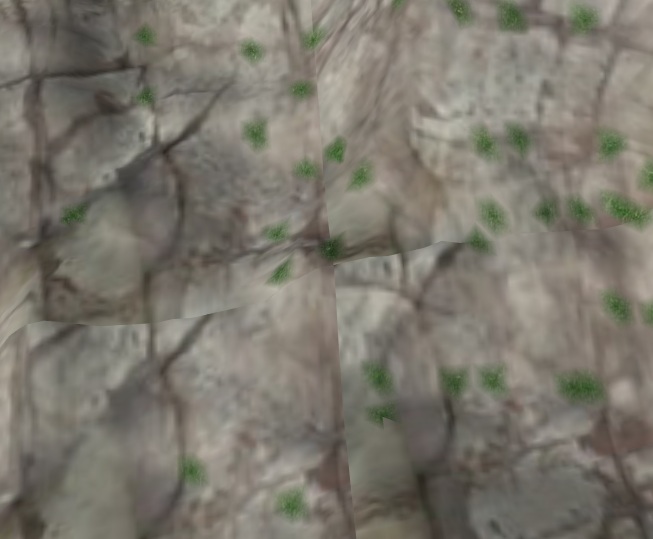
So I have run across another problem which may not be entirely due to applying the Triplanar Texturing codes, but in conjunction with the smooth surface extractor and the smoothRegion function in Filter.inl a material blending error occurs.
Attachment:
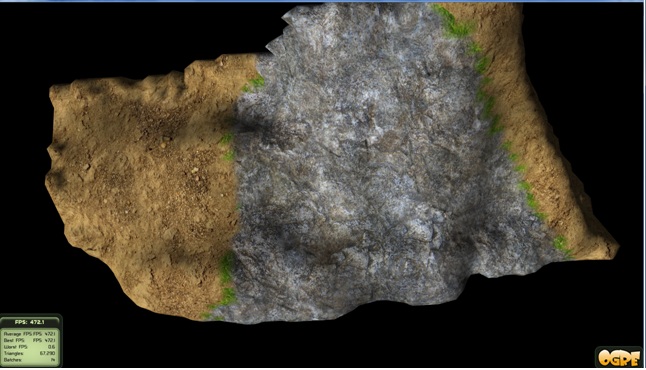 smoothing.jpg [ 79.57 KiB | Viewed 2713 times ]
Shown above, when blending between areas of dirt (material 1) and stone (material 2) a material error occurs and grass (material 0) is shown along the boundaries. In contrast, when just using the smooth surface extractor and no extra smoothing, no error occurs between the boundary of materials:
Attachment:
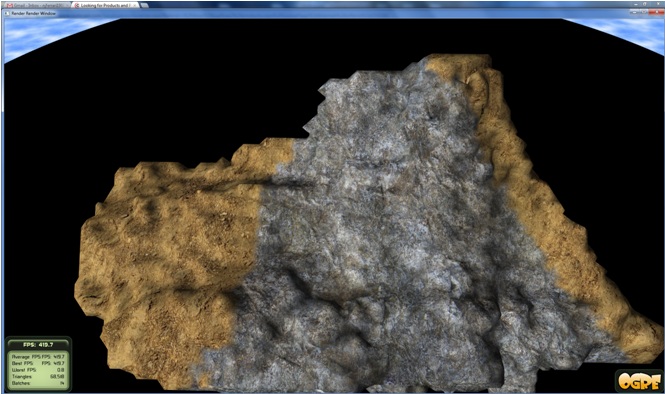 nosmoothing.jpg [ 90.55 KiB | Viewed 2713 times ]
This leads me to believe the smoothRegion function is not addressing the interpolation of materials accordingly. I have already made some adjustments to the smoothRegion function to cover interpolation of neighboring materials when a previously empty space is set to a solid, but I am unable to capture this border error correctly.
Code: Region croppedRegion = regionToSmooth;
uint32_t uArrayWidth = croppedRegion.getUpperCorner().getX() - croppedRegion.getLowerCorner().getX() + 1;
uint32_t uArrayHeight = croppedRegion.getUpperCorner().getY() - croppedRegion.getLowerCorner().getY() + 1;
uint32_t uArrayDepth = croppedRegion.getUpperCorner().getZ() - croppedRegion.getLowerCorner().getZ() + 1;
Array<3, uint16_t> temp(ArraySizes(uArrayWidth)(uArrayHeight)(uArrayDepth));
Array<3, uint16_t> temp2(ArraySizes(uArrayWidth)(uArrayHeight)(uArrayDepth));
int mat;
const int numtextures = 10; //Assuming we are using 10 textures
for (int32_t z = croppedRegion.getLowerCorner().getZ(); z <= croppedRegion.getUpperCorner().getZ(); z++)
{
for (int32_t y = croppedRegion.getLowerCorner().getY(); y <= croppedRegion.getUpperCorner().getY(); y++)
{
for (int32_t x = croppedRegion.getLowerCorner().getX(); x <= croppedRegion.getUpperCorner().getX(); x++)
{
uint16_t& uDensity = temp[x-croppedRegion.getLowerCorner().getX()][y-croppedRegion.getLowerCorner().getY()][z-croppedRegion.getLowerCorner().getZ()];
uint16_t& uMaterial = temp2[x-croppedRegion.getLowerCorner().getX()][y-croppedRegion.getLowerCorner().getY()][z-croppedRegion.getLowerCorner().getZ()];
int mattemp[10] = {0};
uDensity=0;
////////////Interpolating voxel densities to achieve smoothness////////////
uDensity += volData.getVoxelAt(x-1,y-1,z-1).getDensity();
uDensity += volData.getVoxelAt(x-1,y-1,z-0).getDensity();
uDensity += volData.getVoxelAt(x-1,y-1,z+1).getDensity();
uDensity += volData.getVoxelAt(x-1,y-0,z-1).getDensity();
uDensity += volData.getVoxelAt(x-1,y-0,z-0).getDensity();
uDensity += volData.getVoxelAt(x-1,y-0,z+1).getDensity();
uDensity += volData.getVoxelAt(x-1,y+1,z-1).getDensity();
uDensity += volData.getVoxelAt(x-1,y+1,z-0).getDensity();
uDensity += volData.getVoxelAt(x-1,y+1,z+1).getDensity();
uDensity += volData.getVoxelAt(x-0,y-1,z-1).getDensity();
uDensity += volData.getVoxelAt(x-0,y-1,z-0).getDensity();
uDensity += volData.getVoxelAt(x-0,y-1,z+1).getDensity();
uDensity += volData.getVoxelAt(x-0,y-0,z-1).getDensity();
uDensity += volData.getVoxelAt(x-0,y-0,z-0).getDensity();
uDensity += volData.getVoxelAt(x-0,y-0,z+1).getDensity();
uDensity += volData.getVoxelAt(x-0,y+1,z-1).getDensity();
uDensity += volData.getVoxelAt(x-0,y+1,z-0).getDensity();
uDensity += volData.getVoxelAt(x-0,y+1,z+1).getDensity();
uDensity += volData.getVoxelAt(x+1,y-1,z-1).getDensity();
uDensity += volData.getVoxelAt(x+1,y-1,z-0).getDensity();
uDensity += volData.getVoxelAt(x+1,y-1,z+1).getDensity();
uDensity += volData.getVoxelAt(x+1,y-0,z-1).getDensity();
uDensity += volData.getVoxelAt(x+1,y-0,z-0).getDensity();
uDensity += volData.getVoxelAt(x+1,y-0,z+1).getDensity();
uDensity += volData.getVoxelAt(x+1,y+1,z-1).getDensity();
uDensity += volData.getVoxelAt(x+1,y+1,z-0).getDensity();
uDensity += volData.getVoxelAt(x+1,y+1,z+1).getDensity();
uDensity /= 27;
//////////////Material Correction for blank voxels/////////////////////
if (volData.getVoxelAt(x,y,z).getMaterial()==0)
{
mat = volData.getVoxelAt(x-1,y-1,z-1).getMaterial();
++mattemp[mat];
mat = volData.getVoxelAt(x-1,y-1,z-0).getMaterial();
++mattemp[mat];
mat = volData.getVoxelAt(x-1,y-1,z+1).getMaterial();
++mattemp[mat];
mat = volData.getVoxelAt(x-1,y-0,z-1).getMaterial();
++mattemp[mat];
mat = volData.getVoxelAt(x-1,y-0,z-0).getMaterial();
++mattemp[mat];
mat = volData.getVoxelAt(x-1,y-0,z+1).getMaterial();
++mattemp[mat];
mat = volData.getVoxelAt(x-1,y+1,z-1).getMaterial();
++mattemp[mat];
mat = volData.getVoxelAt(x-1,y+1,z-0).getMaterial();
++mattemp[mat];
mat = volData.getVoxelAt(x-1,y+1,z+1).getMaterial();
++mattemp[mat];
mat = volData.getVoxelAt(x-0,y-1,z-1).getMaterial();
++mattemp[mat];
mat = volData.getVoxelAt(x-0,y-1,z-0).getMaterial();
++mattemp[mat];
mat = volData.getVoxelAt(x-0,y-1,z+1).getMaterial();
++mattemp[mat];
mat = volData.getVoxelAt(x-0,y-0,z-1).getMaterial();
++mattemp[mat];
mat = volData.getVoxelAt(x-0,y-0,z-0).getMaterial();
++mattemp[mat];
mat = volData.getVoxelAt(x-0,y-0,z+1).getMaterial();
++mattemp[mat];
mat = volData.getVoxelAt(x-0,y+1,z-1).getMaterial();
++mattemp[mat];
mat = volData.getVoxelAt(x-0,y+1,z-0).getMaterial();
++mattemp[mat];
mat = volData.getVoxelAt(x-0,y+1,z+1).getMaterial();
++mattemp[mat];
mat = volData.getVoxelAt(x+1,y-1,z-1).getMaterial();
++mattemp[mat];
mat = volData.getVoxelAt(x+1,y-1,z-0).getMaterial();
++mattemp[mat];
mat = volData.getVoxelAt(x+1,y-1,z+1).getMaterial();
++mattemp[mat];
mat = volData.getVoxelAt(x+1,y-0,z-1).getMaterial();
++mattemp[mat];
mat = volData.getVoxelAt(x+1,y-0,z-0).getMaterial();
++mattemp[mat];
mat = volData.getVoxelAt(x+1,y-0,z+1).getMaterial();
++mattemp[mat];
mat = volData.getVoxelAt(x+1,y+1,z-1).getMaterial();
++mattemp[mat];
mat = volData.getVoxelAt(x+1,y+1,z-0).getMaterial();
++mattemp[mat];
mat = volData.getVoxelAt(x+1,y+1,z+1).getMaterial();
++mattemp[mat];
}
//the replacement material is set to the mode of its neighbors.
uMaterial = std::distance(mattemp,max_element(mattemp+1,mattemp+numtextures));
}
}
}
for (int32_t z = croppedRegion.getLowerCorner().getZ(); z < croppedRegion.getUpperCorner().getZ(); z++)
{
for (int32_t y = croppedRegion.getLowerCorner().getY(); y < croppedRegion.getUpperCorner().getY(); y++)
{
for (int32_t x = croppedRegion.getLowerCorner().getX(); x < croppedRegion.getUpperCorner().getX(); x++)
{
uint16_t& uDensity = temp[x-croppedRegion.getLowerCorner().getX()][y-croppedRegion.getLowerCorner().getY()][z-croppedRegion.getLowerCorner().getZ()];
uint16_t& uMaterial = temp2[x-croppedRegion.getLowerCorner().getX()][y-croppedRegion.getLowerCorner().getY()][z-croppedRegion.getLowerCorner().getZ()];
MaterialDensityPair44 val = volData.getVoxelAt(x,y,z);
val.setDensity(uDensity);
//Overwright material if incorrect
if (volData.getVoxelAt(x,y,z).getMaterial()==0)
{
val.setMaterial(uMaterial);
}
volData.setVoxelAt(x,y,z,val);
}
}
}
}
}
Your thoughts are welcome
|